What @alaznah/calling autolinks, what you must add in the host app, and the JS bridges for CallKit, push, PiP, and permissions.
Native Modules
@alaznah/calling is not JavaScript-only. Voice, video, incoming UI, PiP, and kill-state wake all go through two native modules plus WebRTC.
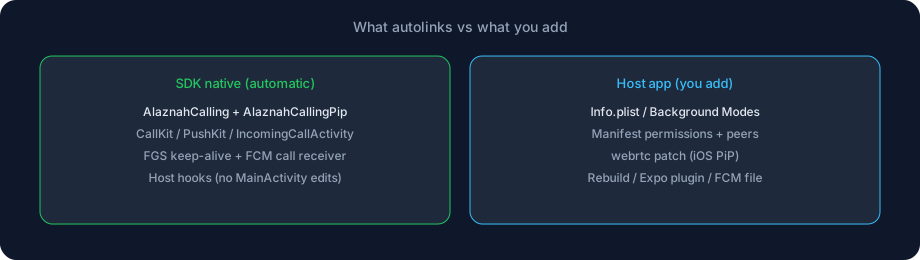
This page is the host-app checklist: what autolinks, what you add, and what you must not duplicate.
Expo Go cannot load these modules. Use a React Native CLI app or an Expo development build. After any native change, rebuild — Metro reload is not enough.
Modules that autolink
After npm install @alaznah/calling + peers, autolinking registers:
| Native name | Platform | Type | Purpose |
|---|---|---|---|
AlaznahCalling | iOS + Android | Turbo Module | Permissions, incoming UI, CallKit/PushKit, torch, reject-from-notification, CallKit connected state |
AlaznahCallingPip | iOS + Android | Native module | System Picture-in-Picture enter / support / mode events |
AlaznahTextureVideoView | Android | View manager | PiP TextureView (used internally) |
You import JS helpers from @alaznah/calling. You do not call NativeModules.AlaznahCalling yourself unless you are debugging.
iOS — bundled automatically
The AlaznahCalling pod links CallKit, PushKit, UserNotifications, and AVKit. On load it bootstraps:
| SDK native | What it does |
|---|---|
| PushKit registry | VoIP token for killed-state incoming |
| CallKit provider | System incoming Accept / Decline |
| CallKit ↔ WebRTC audio | Media after a CallKit answer |
| Background camera helper | Capture during PiP (iOS 16+) |
AlaznahCallingPip | PiP lifecycle → JS |
Do not add your own CXProvider, PKPushRegistry, or AVPictureInPictureController in AppDelegate.
Pod target: iOS 15.1+. System video PiP needs a physical iPhone (iOS 15+).
Android — merged automatically
The library AndroidManifest merges into your app:
| Merged component | Purpose |
|---|---|
IncomingCallActivity + IncomingCallService | Full-screen incoming when locked / killed |
IncomingCallActionReceiver | Notification Accept / Decline |
ActiveCallKeepAliveService | Ongoing-call foreground service (mic / camera / playback types) |
AlaznahPipActivity | Minimize-button system PiP |
supportsPictureInPicture on ${applicationId}.MainActivity | Home-button Activity PiP |
CallMessagingReceiver | FCM incoming_call / call_canceled before React Native Firebase JS |
| Removes default RN Firebase messaging receiver | Avoids duplicate call notifications |
Host Activity code is not required for a standard RN app whose launcher is MainActivity. AlaznahCallingHostHooks attach via ActivityEventListener (onNewIntent, onUserLeaveHint, lock-screen flags, PiP listener).
What you must add (host app)
Autolinking does not replace plist strings, Xcode capabilities, the WebRTC PiP patch, or Firebase files.
1. Peer native packages
Install in your app (not inside the SDK):
npm install react-native-webrtc react-native-incall-manager @react-native-community/netinfo react-native-svg| Peer | Native role |
|---|---|
react-native-webrtc | Peer connections + RTCView (iOS PiP source) |
react-native-incall-manager | Audio session / speaker |
@react-native-community/netinfo | Reconnect when the radio drops |
react-native-svg | Built-in call icons |
Optional: react-native-callkeep only if you explicitly turn on enableCallKeep. The SDK’s own CallKit path does not need it — a second provider on iOS is harmful.
2. iOS — Info.plist + capabilities
<key>NSMicrophoneUsageDescription</key>
<string>Microphone access is required for audio and video calls.</string>
<key>NSCameraUsageDescription</key>
<string>Camera access is required for video calls.</string>
<key>UIBackgroundModes</key>
<array>
  <string>audio</string>
  <string>voip</string>
  <string>remote-notification</string>
</array>
Xcode → Signing & Capabilities:
| Capability | Needed for |
|---|---|
| Background Modes → Audio | Call audio + video PiP in background |
| Background Modes → Voice over IP | PushKit wake when killed |
| Push Notifications | APNs / VoIP delivery |
Then:
cd ios && pod install && cd ..3. iOS — WebRTC PiP patch
Required for production iOS Picture-in-Picture. Patch files live in the SDK; point patch-package at them:
npm i -D patch-package{
"scripts": {
"postinstall": "patch-package --patch-dir node_modules/@alaznah/calling/patches"
}
}Reinstall and rebuild iOS. Details: Picture in Picture.
4. Android — permissions
The library already declares camera, mic, FGS types, full-screen intent, and related permissions. If merge is incomplete, copy them into your android/app/src/main/AndroidManifest.xml:
<uses-permission android:name="android.permission.INTERNET" />
<uses-permission android:name="android.permission.RECORD_AUDIO" />
<uses-permission android:name="android.permission.CAMERA" />
<uses-permission android:name="android.permission.MODIFY_AUDIO_SETTINGS" />
<uses-permission android:name="android.permission.POST_NOTIFICATIONS" />
<uses-permission android:name="android.permission.BLUETOOTH_CONNECT" />
<uses-permission android:name="android.permission.WAKE_LOCK" />
<uses-permission android:name="android.permission.VIBRATE" />
<uses-permission android:name="android.permission.USE_FULL_SCREEN_INTENT" />
<uses-permission android:name="android.permission.FOREGROUND_SERVICE" />
<uses-permission android:name="android.permission.FOREGROUND_SERVICE_PHONE_CALL" />
<uses-permission android:name="android.permission.FOREGROUND_SERVICE_MICROPHONE" />
<uses-permission android:name="android.permission.FOREGROUND_SERVICE_CAMERA" />
<uses-permission android:name="android.permission.FOREGROUND_SERVICE_MEDIA_PLAYBACK" />
ActiveCallKeepAliveService uses microphone / camera / mediaPlayback (and phone-call as a fallback). Android 14+ will drop a mis-typed FGS.
Runtime: requestCallPermissions('audio' | 'video') before the first call. On API 33+ also request POST_NOTIFICATIONS. On API 34+, the user may need to allow full-screen intents in system settings for lock-screen incoming.
Release minify: the AAR ships consumer-rules.pro that keeps WebRTC / PiP reflection (com.oney.WebRTCModule.*, org.webrtc.**). You should not copy those rules unless merge fails. Enable minifyEnabled as you normally would.
5. Android — custom Activity name
Only if the launcher is not ${applicationId}.MainActivity — Picture in Picture.
Do not add CallMessagingReceiver, IncomingCallActivity, or onUserLeaveHint PiP code yourself.
6. Android — Firebase (kill-state incoming)
For ringing when the app is killed:
google-services.jsoninandroid/app/@react-native-firebase/app+@react-native-firebase/messaging- FCM server key in the Developer Console
registerPushToken(token, 'android')
The SDK native receiver handles call payloads first. Other FCM messages still reach React Native Firebase when that package is installed.
Full push walkthrough: Background Calling.
7. Expo development build
{
  "expo": {
    "plugins": ["@alaznah/calling"]
  }
}
The plugin injects camera/mic usage strings, UIBackgroundModes (audio, voip, remote-notification), and the Android permission list. Then npx expo prebuild (or EAS) and verify the generated plist / manifest.
JavaScript bridges (use these, not raw native)
import {
  requestCallPermissions,
  registerIosVoipToken,
  onIosVoipToken,
  handleBackgroundIncomingCall,
  consumeNativeIncomingAction,
} from '@alaznah/calling';

// Before startCall / accept
await requestCallPermissions('video');

// iOS kill-state ring — VoIP token, not FCM
const voip = await registerIosVoipToken();
const stop = onIosVoipToken((token) => {
  void client.registerPushToken(token, 'ios');
});

// After native Accept / Decline, before showing JS incoming UI
await client.drainNativeIncomingAction();
await client.syncPendingCalls();| Helper | When |
|---|---|
requestCallPermissions | First call; maps to the native permission module |
registerIosVoipToken / onIosVoipToken | iOS PushKit token → registerPushToken(..., 'ios') |
client.drainNativeIncomingAction | Resume after CallKit / Android full-screen Accept |
client.setNativeIncomingSuppressed | Hide native incoming while in-app UI is visible |
handleBackgroundIncomingCall | Optional FCM data while the app is already open |
useWakingForCall() | Cold-start accept in progress |
CallingProvider already drains native actions and reconnects on AppState → active. Custom navigation still needs the same resume hooks — Incoming Calls.
The SDK also calls native methods internally (you do not wire these):
| Native method | Used for |
|---|---|
configureCallEndpoint | Android notification Decline can POST /call/reject without opening JS |
storeRejectToken | Short-lived grant from the invite push |
showIncoming / cancel | Native incoming UI |
enableBackgroundCamera | iOS PiP camera |
reportCallConnected | CallKit PiP mute / end |
hasCameraTorch / setCameraTorch | Flash when torchAvailable |
Rebuild
cd ios && pod install && cd ..
npx react-native run-ios
npx react-native run-android
Do not add in the host app
| Tempting copy-paste | Why not |
|---|---|
| Second CallKit provider / CallKeep on iOS | Conflicts with AlaznahCallingManager |
Custom AVPictureInPictureController | SDK + patched WebRTC own the remote view |
MainActivity.onUserLeaveHint → enterPictureInPictureMode | Already hooked |
| Extra FCM receiver for Alaznah call payloads | CallMessagingReceiver already merged |
| Expo Go | Native modules are not in that binary |
Checklist
- Peers installed and native rebuild done
- iOS usage strings + Background Modes + Push capability
-
postinstallwebrtc patch (iOS PiP) - Android permissions merged (including FGS microphone / camera)
- Launcher Activity is
MainActivity, or PiP flags added manually - (Incoming when killed) FCM / APNs credentials + token registration
-
CallingProvider+CallingUI/CallingScreenmounted -
config.displayNameandstartCall({ calleeDisplayName })set (required in current SDK)